We’re pleased to introduce the October 2026 update to our logistics management platform, delivering a suite of powerful enhancements designed to elevate your workflow and streamline daily operations. Our platform is updated weekly to ensure continuous improvement and innovation. This release includes several key upgrades and new capabilities:
1. Contactless Signature for Proof of Delivery
We have released Contactless Signature, a new option that allows customers to sign for deliveries using their own mobile device instead of the driver’s phone. This helps reduce physical contact between drivers and customers while still providing a valid electronic signature for deliveries that require signature confirmation, such as prescriptions, alcohol, sensitive documents, and other regulated deliveries. The signature is securely linked to the delivery task and remains available to both drivers and dispatchers. Contactless Signature works alongside the existing on-device signature option, giving businesses and customers greater flexibility when completing signature-required deliveries.
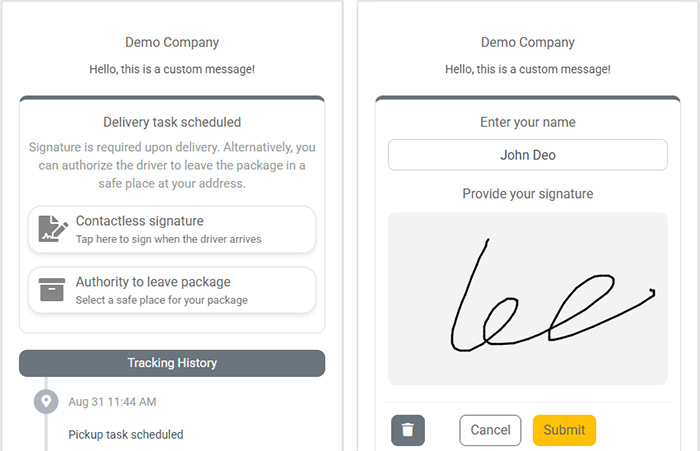
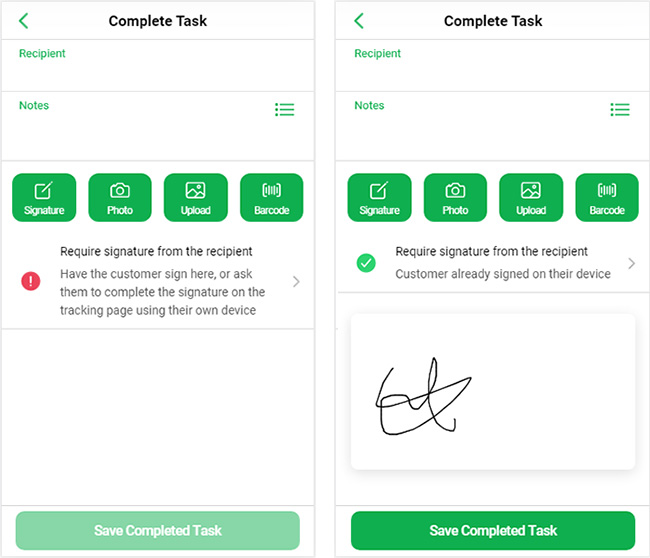
Once the Contactless Signature add-on is enabled from the Extensions page, the option will automatically be available when a task requires a mandatory signature. Customers can open their tracking link on any mobile browser, select Contactless Signature, enter their name, and draw their signature without installing an app. Businesses can use automated SMS or email notifications to send the tracking link, allowing customers to sign before the driver arrives or while the driver is at the destination. When the driver opens the task, a previously submitted signature will be shown as pre-registered, allowing the driver to complete the delivery without requesting another signature. If no signature has been submitted, the driver can still collect one directly on their device. Both signature methods are fully supported and satisfy the task’s signature requirement.
2. Automatic External ID Generation
We’ve introduced a new Automatic External ID Generation feature that makes it easier to create and manage custom identifiers for delivery tasks. The External ID is commonly used to store an order number, invoice number, or another reference from a third-party system. It is automatically populated for tasks created through integrations such as Shopify and WooCommerce, and can also be used to link pickup and delivery tasks or track delivery status. Previously, when tasks were created manually, users had to enter an External ID themselves or leave the field blank, which could be inconvenient for businesses that wanted consistent internal reference numbers.
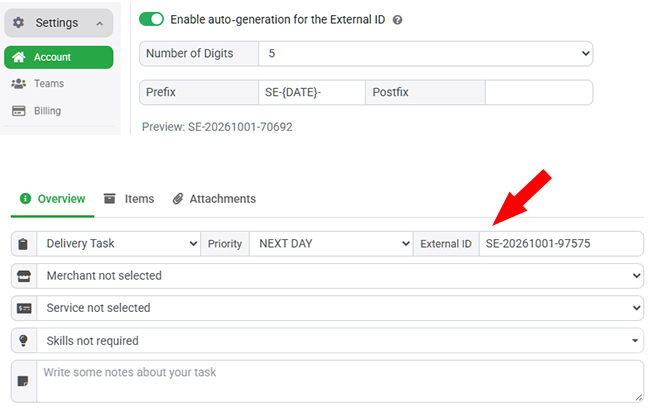
With this update, administrators can enable External ID Auto-Generation from Settings – Account page and configure how the IDs are created. You can specify the number of digits, as well as a custom prefix and postfix. You can also use the DATE tag within the prefix or postfix, allowing the system to automatically include the current date in each generated ID. This gives businesses the flexibility to create their own easy-to-read and memorable task IDs, making it easier to reference and track deliveries instead of relying on the standard random Task GUID.
3. Route Plan API for Multi-Route Planner
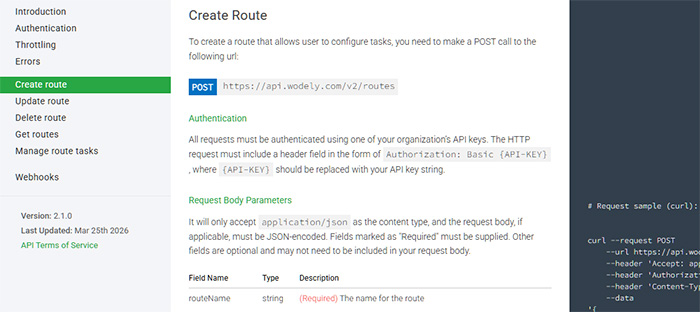
We’ve recently introduced new Route Plan API endpoints for the Multi-Route Planner, giving developers greater control over route planning and management through custom integrations. The new APIs allow you to create, update, and delete routes, as well as manage the tasks assigned to each route. This makes it possible to integrate route management directly into your own systems and workflows without relying solely on the web portal.
The Route Plan API also supports route optimization, allowing your integration to create and manage routes and then optimize them programmatically. This is particularly useful for businesses that require full control over their route planning process or want to connect the Multi-Route Planner with their existing logistics, ERP, order management, or custom business systems. With these new endpoints, developers can build more automated and flexible route management workflows tailored to their specific operational requirements.
4. Shipping Label Print Scale Adjustment
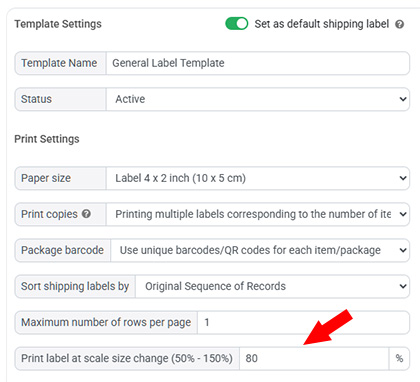
We’ve introduced a new Print Label Scale setting to make custom shipping labels easier to print across different paper sizes and label formats. Our custom shipping label designer supports a variety of formats, including standard paper, adhesive labels, and POS receipt paper. However, when printing a label on smaller paper or a narrow sticker, the content could sometimes extend beyond the printable area and result in information being cut off.
With the new Print Label Scale setting, you can adjust the print size from 50% to 150% to better fit your label content to the selected paper size. If a label is too large for the available printing area, simply reduce the scale and the system will automatically resize the content to fit. You can also increase the scale when printing on larger paper or when you need the label content to be more prominent. This provides greater flexibility and helps ensure your shipping labels print cleanly across different printers and paper formats.