Welcome to the November 2026 Release Notes! We continue to enhance the platform with weekly updates, and this release brings a range of new features and improvements. Highlights include live vehicle speeding tracking, user and merchant document management, and enhancements to live tracking and the customer tracking page. We hope these updates help you get even more value from the platform.
1. Live Vehicle Speed Tracking and Speed-Based Route History
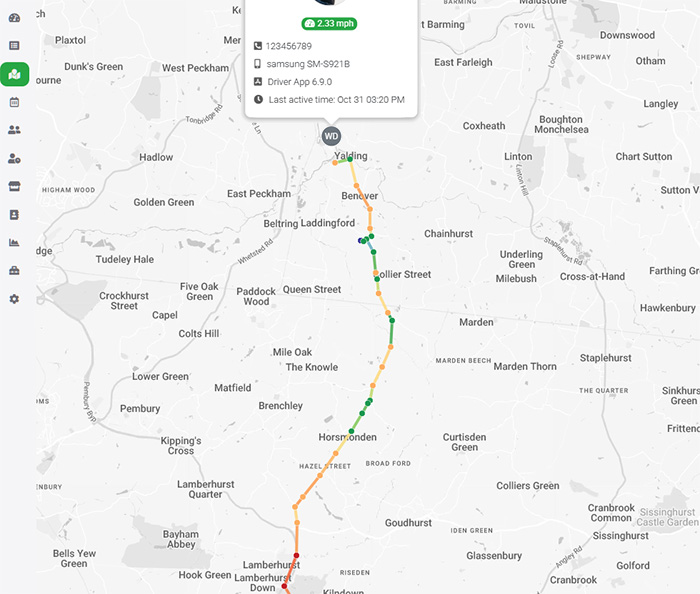
We’ve enhanced the Live Tracking module to provide dispatchers with real-time visibility into driver vehicle speeds directly from the web portal. Driver map markers now display different colours to indicate their current driving status and speed: Grey for offline, Blue for stationary, Green for low speed, Yellow for moderate speed, and Red for high speed. This allows dispatchers to quickly identify which drivers are offline, stationary, moving slowly, or travelling at higher speeds, making it easier to monitor fleet activity and understand driver movements at a glance.
Additionally, we’ve upgraded the Location History feature with colour-coded route lines using a heatmap-style display to represent vehicle speeds along the journey. When replaying a driver’s location history, dispatchers can easily identify speed variations at different points along the route. For example, if a delivery is delayed, they can review the route history to identify sections where the vehicle was moving slowly, potentially indicating heavy traffic congestion or other road conditions. These enhancements provide better fleet visibility and help businesses investigate delivery delays and improve operational efficiency.
2. Document Management for Users and Merchants
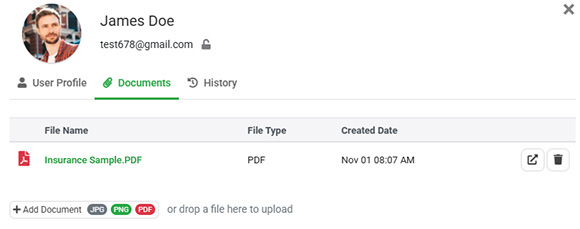
We’ve introduced a new Document Management feature that allows administrators to upload and manage documents directly within individual user and merchant profiles. You can now attach PDF files and images to each profile, with all documents securely stored in the backend cloud storage. Administrators can easily access, update, or remove these attachments whenever required, providing a centralized location to manage important business documents without relying on separate file storage systems.
This feature is particularly useful for maintaining records related to drivers, team members, and business partners. For example, you can upload a driver’s insurance certificates, licences, or compliance documents to their user profile, or attach contracts, agreements, and other business documents to a merchant’s profile. By keeping these documents organized within the platform, businesses can simplify document management, improve record accessibility, and maintain important operational records in one place.
3. Force Background Location Access for Drivers
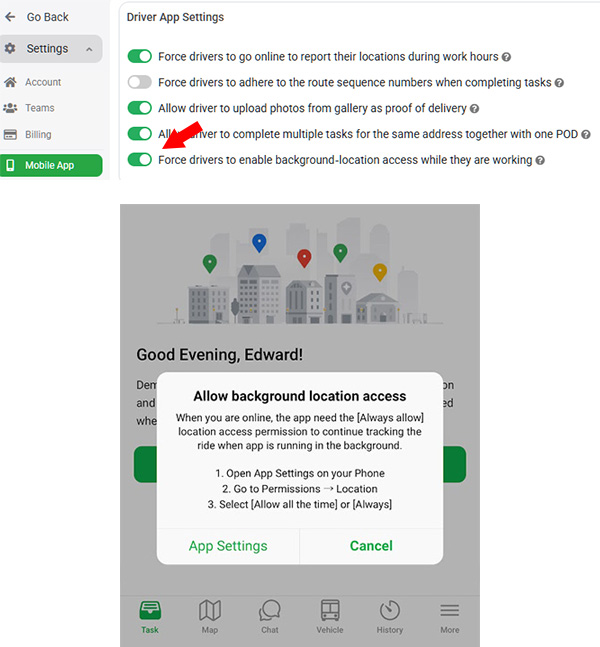
We’ve introduced a new Force Background Location Access setting to improve the reliability of live driver tracking. Continuous location tracking requires drivers to grant the “Always Allow” location permission on their mobile devices, allowing the app to collect location updates even when running in the background. Previously, the driver app would remind users to enable background location access when starting work, but drivers could ignore these reminders or accidentally disable the permission through iOS system prompts. When this happens, live location tracking may stop unexpectedly, reducing visibility for dispatchers and customers.
With this update, administrators can enforce background location access through Settings → Mobile App page by enabling “Force drivers to enable background-location access while they are working”. Once enabled, drivers will not be able to go online or start working on their tasks until the required background location permission has been granted. The driver app will guide them through the necessary settings with on-screen instructions. This ensures that drivers maintain the required location permissions while working, helping businesses achieve more consistent live tracking and better fleet visibility.
4. Custom Tracking Link Expiry Time
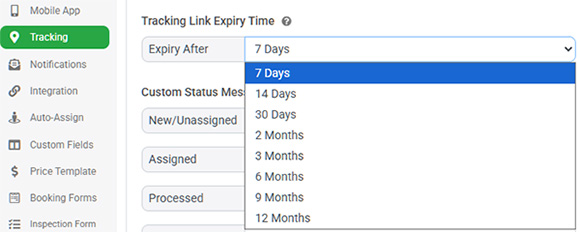
We’ve introduced a new Tracking Link Expiry Time setting, giving businesses greater control over how long customers and recipients can access their delivery tracking pages. Previously, tracking links remained accessible for up to 12 months after a task was completed, allowing customers to revisit previous delivery updates and view Proof of Delivery (POD) information, such as delivery photos and signatures. While this is useful for maintaining delivery records, some businesses may prefer to limit how long customer tracking information remains publicly accessible.
With this update, administrators can now configure the tracking link retention period, choosing an expiry duration ranging from 7 days to 12 months after task completion. Once the selected period has passed, the tracking link will automatically expire, and customers will no longer be able to access the tracking page. This enhancement provides greater flexibility in managing customer data availability, supporting different business requirements, and improving control over the retention of delivery information.