Welcome to the February 2026 release notes! We strive to improve our delivery management platform by adding new features and enhancements and making it even more intuitive to use. This month, we’ve introduced a range of updates and enhancements. Here are some of the key highlights:
1. Driver Payout and COD Reconciliation
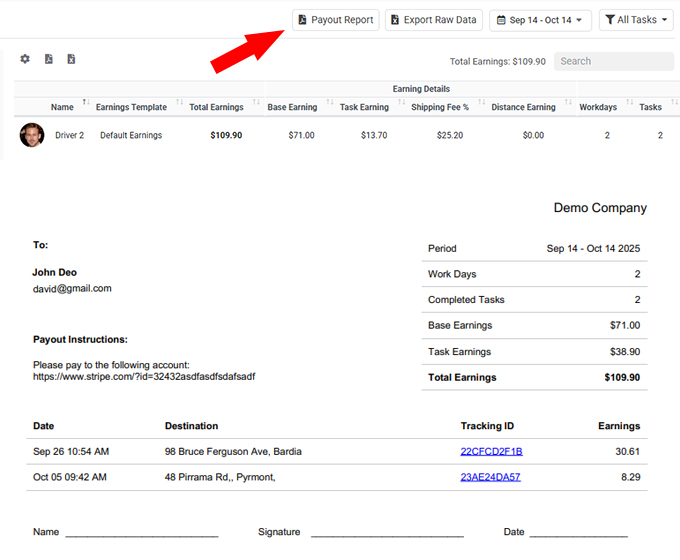
We are excited to introduce Driver Payout and COD Reconciliation, a powerful enhancement to the Driver Earnings module. Administrators can now generate a comprehensive Driver Payout Report that includes detailed earnings breakdowns, completed job summaries, and driver payment instructions in one centralized report. The system automatically calculates payout figures based on your configured driver earnings formulas, ensuring accuracy and consistency across all payment scenarios. This upgrade streamlines payroll preparation, improves transparency, and reduces manual calculations when processing driver payments.
In addition, for businesses handling Cash on Delivery (COD), the new COD Reconciliation feature allows you to include collected COD amounts directly within the payout report. The system automatically reconciles collected COD funds against calculated driver earnings and determines the final payable amount. This provides a clear overview of COD balances, minimizes reconciliation errors, and simplifies end-of-period settlements with drivers. Together, these enhancements provide greater financial control, operational clarity, and efficiency in managing driver payments.
2. Load Vehicle – Package Checking and Scanning
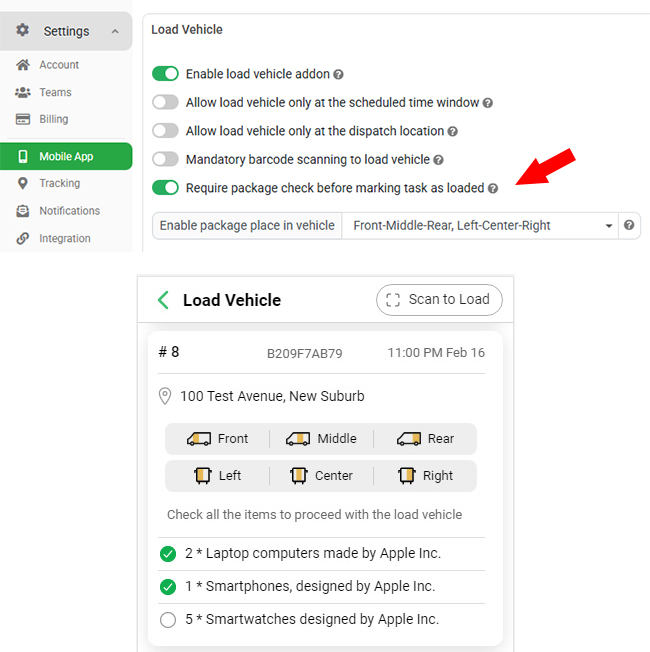
We are pleased to introduce Package Checking and Scanning for the Load Vehicle module, providing greater accuracy and control before vehicles leave for delivery. Previously, loading confirmation was limited to job-level barcode scanning. With this upgrade, businesses can now enable package-level item checking and barcode scanning, allowing drivers to verify each individual package associated with a delivery job. Once activated, all items or packages under each job will be displayed within the Load Vehicle module, and drivers must scan each package barcode to confirm successful loading. This significantly reduces the risk of missing items and improves delivery accuracy.
To support flexible operations, the system offers multiple scanning options. You can enable package-level barcode printing within our Shipping Label module, allowing drivers to simply scan the barcode directly from your generated labels during loading. Alternatively, if you attach custom barcodes to packages when creating delivery tasks, drivers can scan those custom labels for confirmation. If barcodes are not available, drivers can still manually tick off items within the app to confirm loading. This enhancement ensures a more reliable loading process while accommodating different operational workflows.
3. Extended Deleted Task History & Audit Log Export
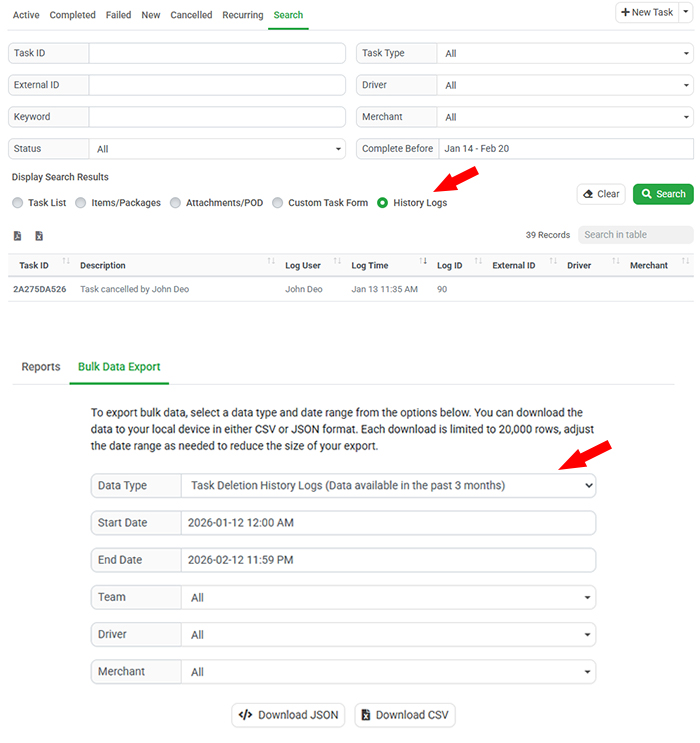
We have enhanced our Deleted Tasks management to improve visibility and audit control. Previously, when a task was cancelled and deleted, it remained accessible in the Cancelled Tasks tab for 7 days, allowing users to restore it if deleted by mistake. After that period, related logs were no longer accessible. With this upgrade, the system now retains deletion history logs for up to 3 months, giving administrators extended traceability. If a task appears to be missing, you can now locate its deletion record directly through the Task Search page by reviewing the task history logs.
In addition, the Analytics – Bulk Data Export module has been upgraded to allow administrators to generate and export Task Deletion History Logs covering the past 3 months. This provides a clear audit trail of deleted records, supporting internal reviews, compliance requirements, and operational investigations. These improvements enhance transparency, strengthen data governance, and ensure your team can confidently track and verify any deleted task activity within the system.
4. Contact Reference ID & External System Integration
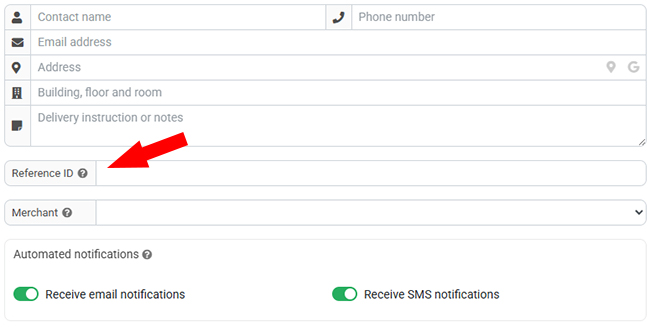
We have enhanced the Contact Management module by introducing a new Reference ID field. This column allows you to store unique identifiers such as employee numbers, customer codes, or external system user IDs. When dispatchers or merchants create a new task, they can simply enter the Reference ID to instantly locate and select the corresponding contact in the system. This significantly speeds up task creation, reduces manual search effort, and minimizes selection errors.
Additionally, for businesses importing contacts from external platforms, the Reference ID can store the original external system ID to maintain consistency across systems. This improves integration capabilities by enabling reliable matching, linking, and verification between systems. With this enhancement, contact lookup becomes more efficient, and cross-platform data synchronization becomes more accurate and scalable.