Welcome to the latest update of our platform. Each month, we deliver new features, improvements, and bug fixes to keep your operations secure, modern, and efficient. This release introduces a range of meaningful enhancements designed to streamline your workflow, boost performance, and elevate your overall experience. Here are some of the key highlights.
1. Route Stop Progress on Customer Tracking Page
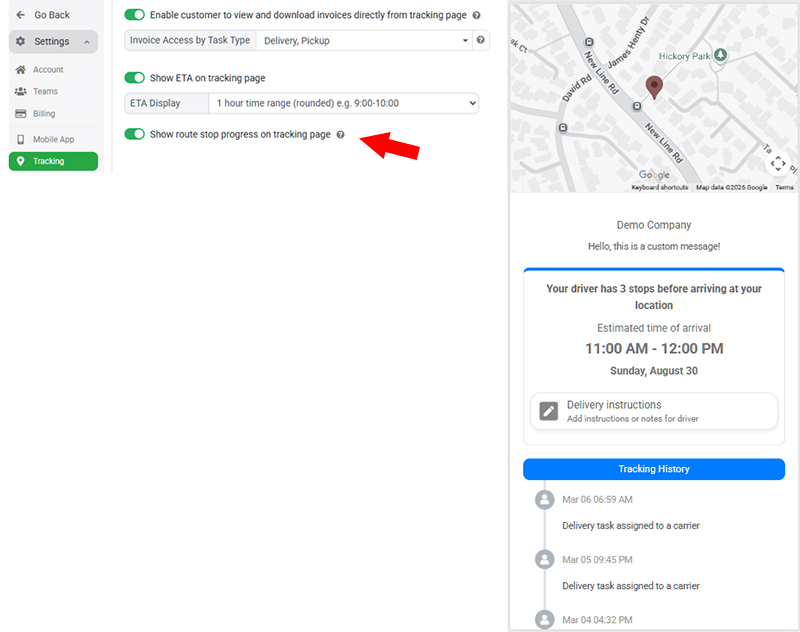
We’ve introduced a new Route Stop Progress feature that provides delivery recipients with greater visibility into the driver’s progress on the customer tracking page. When enabled, recipients can see not only the predicted ETA, but also how many stops the driver has remaining before arriving at their location. For example, the tracking page may show that there are 5 stops before the driver reaches the recipient, giving customers a clearer understanding of where their delivery is in the route.
This additional visibility makes the delivery process more transparent and predictable, helping customers better plan when they need to be available to receive their goods. The feature is available in both Single Route Planner and Multi-Route Planner modes. To enable it, administrators can go to Settings → Tracking page and turn on the Show route stop progress on tracking page option.
2. Enhanced Task Priority Management
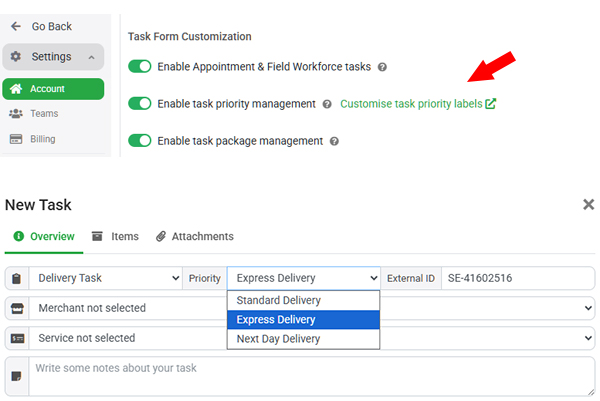
We’ve enhanced the Task Priority Management module to provide greater flexibility and clearer communication across your delivery operations. Administrators can now customize the labels used for task priorities from Settings → Account page, replacing the standard labels such as Urgent, Normal, and Low with wording that better matches your business processes. For example, you can rename Urgent to Express Delivery or use any other terminology that makes the priority level immediately clear to your dispatchers, merchants, drivers, and customers.
We’ve also improved the visibility of high-priority tasks in the mobile apps. Urgent tasks are now more prominently highlighted with a larger map marker and a red priority label, making them easier for drivers and other users to identify at a glance. These enhancements help ensure high-priority deliveries receive the appropriate attention and allow businesses to define priority levels in a way that best suits their operational requirements.
3. Import Tasks from Spreadsheet Directly to Routes
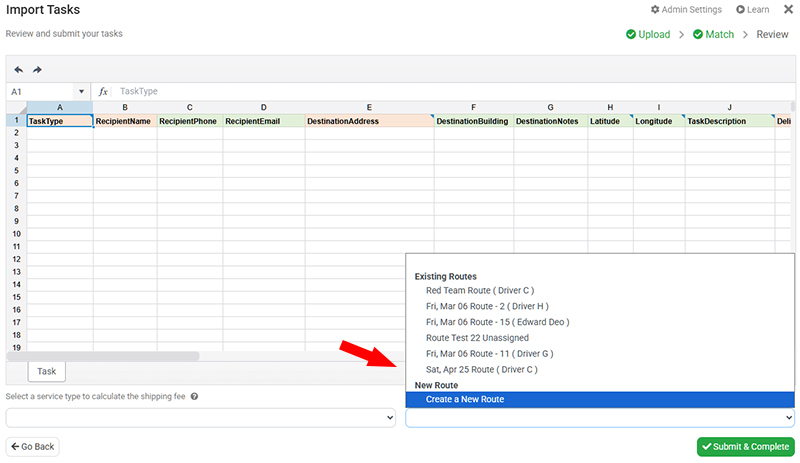
We’ve improved the Multi-Route Planner workflow to make it easier to create routes directly from spreadsheet uploads. Previously, users needed to upload tasks first and then manually assign the imported tasks to an existing route. This could be time-consuming for businesses that commonly createone route from each spreadsheet. With this update, at the last step of the spreadsheet task upload, users can now choose to add the imported tasks directly to an existing route or create a new route specifically for those tasks, significantly simplifying the route creation process.
In addition, users who work with pre-planned route templates now have more flexibility when preparing their routes. Instead of only adding existing tasks to a planned route, you can now import tasks directly from a spreadsheet into the route. This makes it much easier to build complex routes with many stops while keeping the task import and route planning workflow together in one process.
4. Task Deletion and Cancellation Reasons
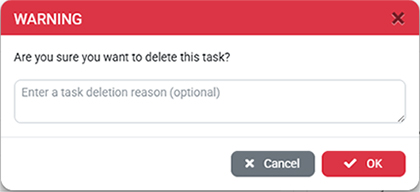
We’ve introduced a new Task Deletion Reason feature to improve visibility and accountability when tasks are cancelled or deleted. Previously, a dispatcher or merchant could accidentally delete a task, or remove it without communicating the reason to other team members. This could lead to confusion when a task is missing or when users need to understand why it was removed. With this update, when a user deletes or cancels a task from the web portal, a confirmation popup will prompt them to enter a reason before completing the action. This reason is then recorded in the Task History Logs for future reference.
The deletion reason provides an additional audit trail for task management and can help teams quickly understand why a task was cancelled or removed. Cancelled tasks are permanently deleted from the database after 7 days, while the associated deletion reason and history log are retained for at least 3 months. This ensures that important audit information remains available even after the original task data has been removed, providing better accountability, communication, and tracking across the team.