Welcome to August 2026. We’re excited to share what’s new on our platform this month. This release includes a range of meaningful improvements and helpful new features designed to make your experience smoother, faster, and more powerful. Here’s a look at some of the key updates that shipped this month.
1. Driver Tipping with Digital Payment Options
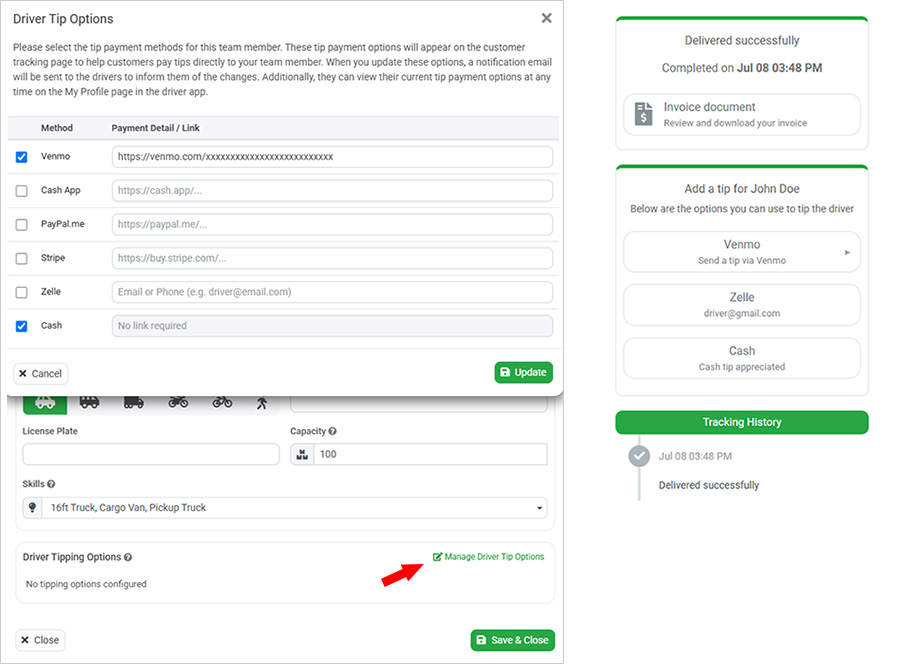
We’re excited to introduce the new Driver Tipping module, making it easy for customers to reward drivers for outstanding service using a range of convenient payment methods. Administrators can configure tipping options for each driver, including Stripe Payment Links, PayPal.Me, Venmo, Cash App, Zelle, and Cash. These payment methods are displayed on the Customer Tracking Page, allowing customers to send a tip directly to their driver with just a few clicks after a successful delivery. This feature helps increase driver earnings, improves customer engagement, and supports both cashless and traditional tipping experiences.
Administrators can manage each driver’s tipping methods from the Users page by opening a user profile and configuring the Tip Payment Options section. The system validates all payment links and contact details before saving, ensuring that customers only see valid payment options. Drivers can also view their configured payment methods from the My Profile page in the driver app. During or after delivery, customers will see a dedicated Tip Driver section on the tracking page. Selecting a payment option will either open the corresponding payment link or display clear instructions for payment methods such as Zelle or Cash, providing a simple, secure, and seamless tipping experience.
2. AI Insights on the Anaytics Reporting
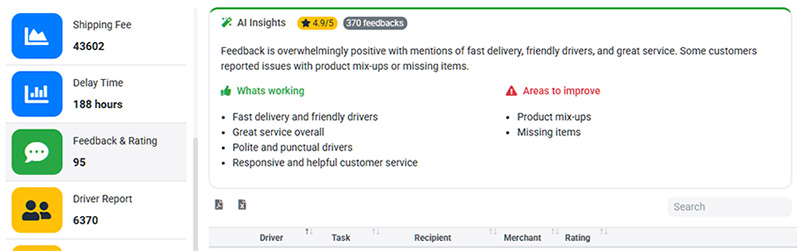
We have recently introduced AI Insights to the Analytics and Reporting module, making it easier to understand large volumes of business reports. Instead of manually reviewing complex reports, you can now receive AI-generated summaries, key insights, and actionable recommendations based on your report results. The AI highlights important trends, identifies unusual patterns, and suggests potential areas for improvement, helping you make faster and more informed business decisions.
AI Insights are especially valuable for reports containing large amounts of customer feedback and operational data. For example, if you collect hundreds of customer ratings and comments through the Feedback and Rating module, the AI can automatically analyze the responses, summarize the most common positive and negative themes, and identify opportunities to improve your service. This allows you to quickly understand what your business is doing well and where improvements can be made without reading every individual comment. This is just the beginning of our AI-powered enhancements, and we look forward to introducing even more intelligent features in future releases.
3. Mandatory Custom Fields for Driver Task Completion
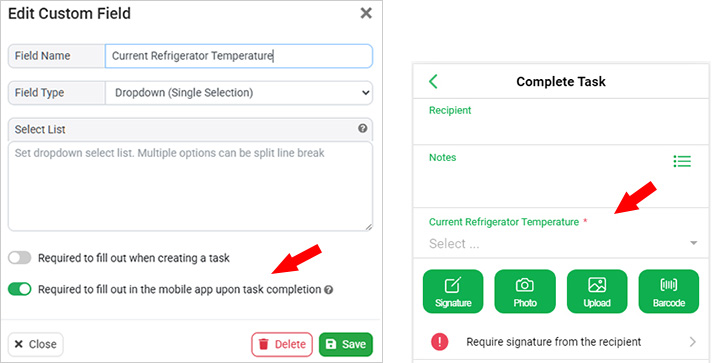
In our recent system upgrade, administrators can require custom fields to be completed by drivers before a task can be marked as completed in the mobile app. You can create custom task fields in a variety of formats, such as text, number, date, and drop-down lists. With this enhancement, selected custom fields can now be marked as mandatory, ensuring drivers provide the required information as part of the task completion process.
This feature is ideal for capturing additional operational data beyond standard Proof of Delivery (POD) information. For example, if you deliver refrigerated goods, you can create a mandatory Fridge Temperature field and require drivers to record the vehicle’s temperature after every delivery. The configuration is simple to set up and is automatically applied to all relevant tasks. For businesses that require more advanced workflows, such as detailed questionnaires or different forms for different task types, the existing POD Form module remains available, while mandatory custom fields provide a lightweight and efficient solution for collecting routine delivery information.
4. Redesigned Customer Tracking Page for Desktop
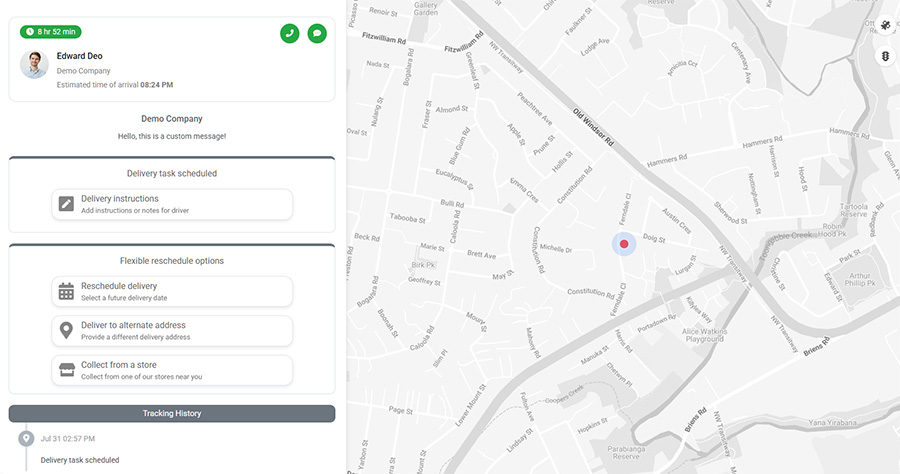
We’ve redesigned the Customer Tracking Page to deliver a better experience on desktop and laptop computers. The tracking page has always been designed with a mobile-first approach, as most customers view their deliveries on a smartphone. On mobile devices, the page displays the live map at the top with a scrollable information panel below, providing an intuitive and modern tracking experience.
With this update, the tracking page now automatically adopts a desktop-optimized layout when viewed on a computer. The detailed delivery information is displayed in a dedicated panel on the left, while the live tracking map is shown on the right, making better use of widescreen displays. This new layout improves readability, provides more space for delivery details, and creates a more natural and professional tracking experience for customers using desktop devices.
5. Route Plan Notes for Drivers
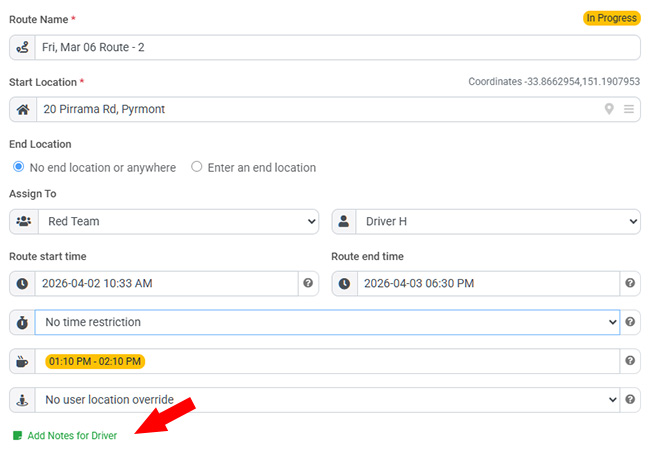
We’ve introduced new route plan notes feature in the Multi-Route Planner that allows dispatchers to add instructions and comments to individual routes. This makes it easy to communicate important information to drivers before they begin their deliveries. For example, you can include instructions on where to collect packages before leaving the depot, special delivery requirements, access information, or any other route-specific notes.
These notes are displayed directly in the driver app whenever drivers preview or open an assigned route. By providing clear instructions alongside the route plan, drivers have all the information they need before starting their deliveries, helping to reduce misunderstandings, improve communication, and ensure smoother delivery operations.