The July 2026 product update is here, bringing a fresh wave of enhancements to elevate your delivery management experience. This release packs in a few upgrades and new features that make your operations smoother, faster, and more efficient. We hope these updates serve you well.
1. Pricing Template: Extra Charge Lines
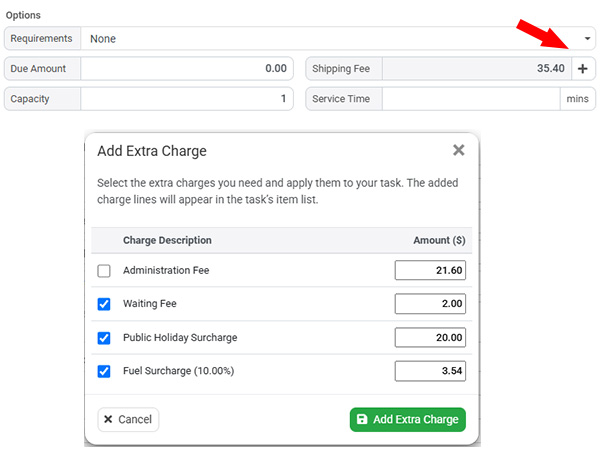
We’re excited to introduce Extra Charge Lines, a new feature that allows you to add additional fees to delivery tasks on top of the shipping rate calculated by your pricing template. This makes it easy to apply charges such as fuel surcharges, public holiday surcharges, waiting time fees, tolls, or other custom service fees. Once a service pricing template has calculated the shipping rate, you can simply add one or more predefined charge lines, and the system will automatically update the final shipping fee. All extra charges are recorded in the Items section of the delivery task, providing a clear breakdown of the total amount charged.
To configure this feature, navigate to Settings → Pricing Templates and open Advanced Settings. From there, you can create a list of predefined charge lines with default descriptions and values for quick selection. Extra charge lines can be added at any stage of the delivery lifecycle, whether the task is newly created, in progress, or even after it has been completed. After selecting a service pricing template and allowing the system to calculate the shipping rate, simply click the plus icon next to the shipping fee to add one or more predefined charges. This enhancement gives businesses greater flexibility in managing additional service costs while keeping pricing transparent and easy to manage.
2. Clone Routes with Tasks
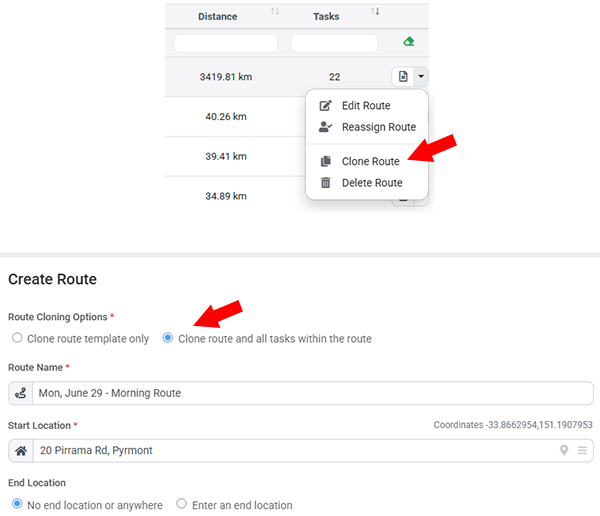
We’ve introduced a new Clone Route feature in the Multi-Route Planner module, making it easier to recreate existing routes for recurring delivery operations. Users can now clone any active or completed route, with the option to copy the route configuration, planning settings, and all tasks contained within the original route can be cloned as well. This provides a fast and convenient way to create new routes based on proven delivery plans without having to rebuild them from scratch.
This feature is especially valuable for businesses that operate fixed delivery routes on a daily, weekly, or monthly schedule. While our recurring tasks can automatically generate individual deliveries, managing large routes with many stops has traditionally required significant manual planning. With the new Clone Route feature, you can create a master route containing all required tasks, then duplicate it whenever needed. The cloned route can be assigned directly to a driver or left unassigned for drivers to self-assign, providing greater flexibility and significantly reducing route planning time.
3. Driver Route Access Timing Controls
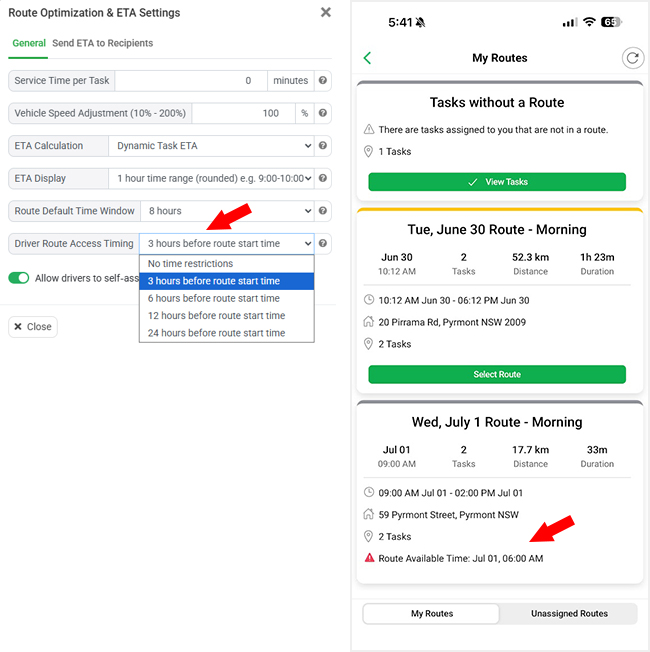
We’ve introduced new Driver Route Access Timing controls in the Multi-Route Planner, giving dispatchers greater control over when drivers can begin working on their assigned routes. By default, with No Time Restrictions enabled, drivers can view and start working on a route immediately after it has been assigned. This provides the same flexible workflow that existing users are familiar with.
For businesses that plan routes in advance, you can now configure a time-based access window to prevent drivers from starting too early. For example, if you set the access window to 3 hours before the planned route start time, drivers can still view the route summary and prepare for their shift on the driver, but they will only be able to access and begin completing tasks during the specified time window. This enhancement helps improve operational control, ensures drivers follow scheduled start times, and supports businesses with structured route planning and shift management.
4. Recipient Name Display Options
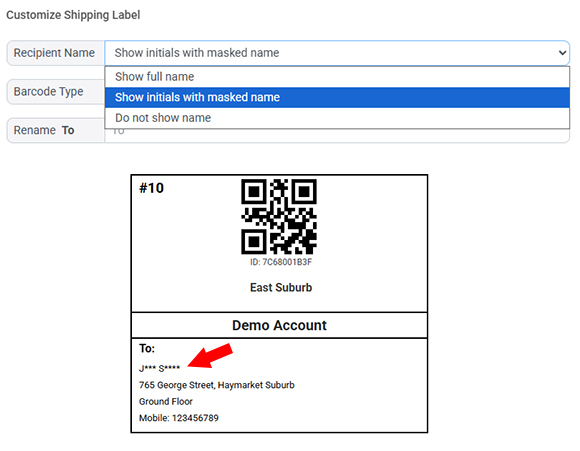
We’ve added new recipient name display options for shipping labels, giving businesses greater control over the personal information printed on packages. You can create multiple shipping label templates for different workflows or users, and each template can now be configured to display the recipient’s name in different ways. Available options include showing the full recipient name, displaying masked initials only, or hiding the recipient name entirely.
This enhancement is designed to help businesses improve customer privacy while maintaining the flexibility to meet different operational requirements. It is particularly useful for deliveries where packages may be left unattended or in public locations, reducing the amount of personal information visible on the shipping label. By using different label templates, organizations can easily apply the appropriate level of privacy for different customers, delivery services, or business processes.
5. API Pagination Support for Large Data Queries
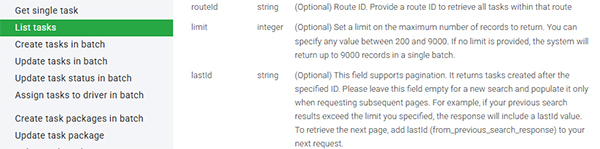
We’ve enhanced our REST API by adding pagination support for endpoints that return large collections of tasks and other data. Previously, API search requests returned all matching records in a single response, which could result in very large payloads when thousands of records were returned. This could impact performance for both client applications and network usage.
With this update, you can now specify a maximum number of records to return in each request, making data retrieval faster and more efficient. The API also introduces a lastId parameter to support seamless pagination. For an initial search, simply leave the lastId field empty. If the number of matching records exceeds your specified limit, the response will include a lastId value. You can then use this value in your next request to retrieve the next page of results. This enhancement provides a more scalable and reliable way to synchronize large datasets while giving developers greater control over API performance and data processing.