
You are currently using your own Google Maps API Key (created under your Google account) to access enhanced Google Map services on our platform, including address auto-complete, dynamic map display, predictive ETAs. You can find your existing API key at the end of the Settings – Account page in your admin dashboard.
Beginning January 2026, WooDelivery will be renamed Wodely. While the existing woodelivery domain will remain accessible, the system will begin using app.wodely.com as the default domain for both the dispatcher web portal and tracking pages.
To ensure your Google Maps API Key continues to function correctly, you must update your API key settings to include the new Wodely domain in the list of allowed websites. This update takes approximately 2 minutes.
Please follow the steps below:
- Log in to your Google Cloud account and search for “Google Maps” using the search bar at the top. Select Google Maps Platform from the results.

- In the left-hand menu, click Keys & Credentials to open the page where you can manage your API keys.

- Select the API key you previously created. Under Website Restrictions, click Add, then add: https://app.wodely.com
Then, click Save button at the bottom of the page to save your changes.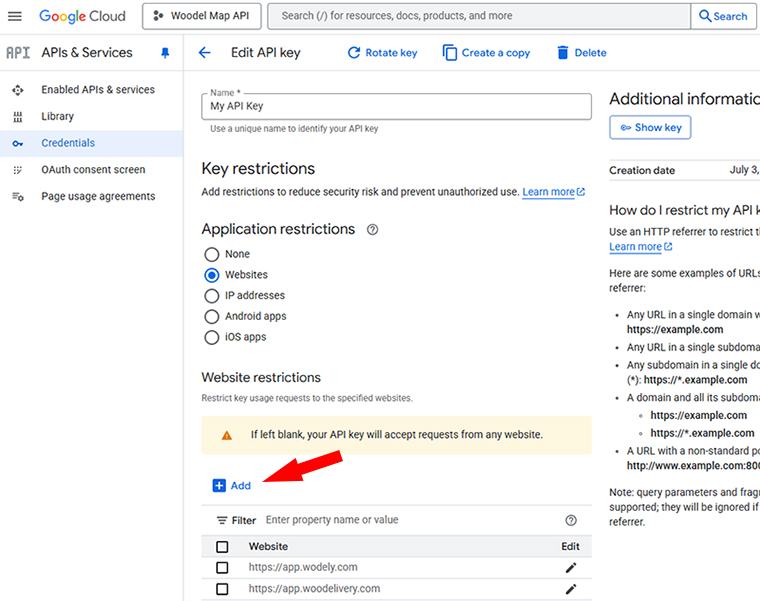
- To confirm everything is working, log in to https://app.wodely.com, navigate to the Map page, and verify that the map loads correctly.
If you need any assistance, please reach out to our support team.