
Webhooks are one way that our system can send automated messages or information to other apps when something happens. It is designed for your application to be notified of important system events, as soon as these take place within Wodely. For example, when driver complete a delivery job on Wodely platform, it sends a real-time JSON message to your in-house system to update the order status to completed status.
How to set up webhooks?
To use the webhook feature, your system needs an endpoint to receive real-time delivery task updates from our system. This endpoint is known as the Webhook Callback URL. You can also use a third-party system to receive webhook messages if needed.
To create a webhook in our system, log in to your admin dashboard and navigate to the Settings – Notifications page. Click on the Add Notification Rule button at the top-right side of the page, then select the webhook method (HTTP GET or HTTP POST) from the drop-down menu.
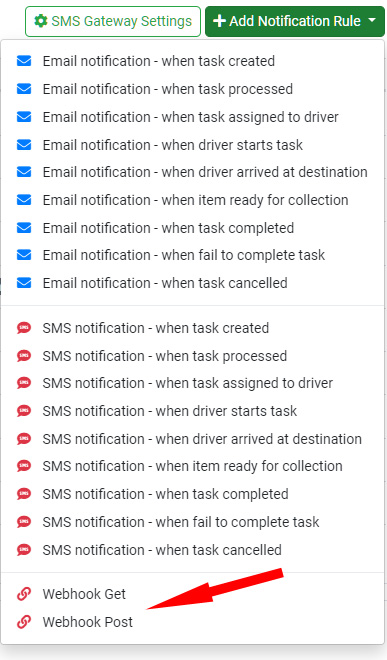
Webhook Trigger Events
The following events can be used to trigger a webhook message to be sent to your system:
| Webhook Event |
|---|
| When new task is created (unassigned status) |
| When task is assigned to a driver |
| When task is processed |
| When packages loaded to vehicle or picked up |
| When driver starts task (transit status) |
| When driver arrived at destination |
| When item ready for collection |
| When task completed successfully |
| When task is failed |
| When item returned to sender |
| When task is cancelled |